Table of Contents
Updated November 2026. As an Amazon Associate we earn from qualifying purchases.
This guide is based on manufacturer specifications and published sources, not a hands-on test of every system in our garden. Where a figure comes from a company, we say so.
Quick Answer: Who the Gardyn Home 4 Is For
The Gardyn Home 4 is a 30-plant indoor hydroponic tower that stands 64 inches tall and occupies two square feet. Gardyn lists two 40-watt LED bars, a published energy use of 47 kilowatt-hours a month, two inward-facing cameras, and a 5-gallon tank in its help documentation. The official hardware price, checked November 16, 2026, is $899.
It makes sense if you want a family-sized indoor harvest and you will actually plant most of the 30 sites. It is a poorer fit if you only need a few herbs, if you cannot spare a little over five feet of height, or if you do not want a Wi-Fi device (it requires 2.4 GHz, not 5 GHz). Membership is optional: the month-to-month Home plan is $39 and includes 10 plant credits and Kelby, the company’s AI assistant, but the garden will run without it.
This review looks at the current Home 4 and, where it helps, the smaller Studio. It is based on Gardyn’s published specifications and help articles, not a grow test in our garden. For the cost math, see Is a Gardyn worth it?. For a comparison with Lettuce Grow’s Farmstand, see Gardyn vs. Lettuce Grow. To place it among countertop systems, start with the best indoor hydroponic gardens guide or the indoor hydroponics hub.
What You Are Buying
Gardyn Home 4 is a vertical indoor garden: three planting columns on a base tank, with two light bars mounted in front of the plants. Seeds arrive in compostable yCubes — tapioca-based shells, according to Gardyn, with the seed in rockwool. You press a cube into a yPod in the column. Water and nutrients circulate through the columns, and the lights run on an automated schedule.
The company currently sells two sizes. The Home is the flagship. The Studio is the compact model.
| Gardyn Home 4 | Gardyn Studio 2 | |
|---|---|---|
| Official price (Nov. 16, 2026) | $899 | $549 |
| Plant sites | 30 | 16 |
| Footprint | 2.0 sq. ft. | 1.4 sq. ft. |
| Dimensions | 24″ W × 12″ D × 64″ H | 17″ W × 12″ D × 54″ H |
| Weight (as shipped) | 20 lb, one box | 14 lb, one box |
| Lights | Two 40W LEDs | One 52W LED |
| Energy estimate | 47 kWh/month | 26 kWh/month |
| Cameras | Two 5MP, inward facing | One 8MP, inward facing |
| Month-to-month membership | $39, 10 plant credits | $25, 5 plant credits |
| Yield claim | Up to 10 lb/month; 8–10 lb on the Home product page | Up to 5 lb/month |
Those yield figures are Gardyn’s, and they depend on what you plant. Leafy greens harvested often will get you closer to a high number than a column of slow herbs. Treat them as a ceiling, not a promise.
Older Home generations (1, 2, and 3) share the same basic layout — three columns, two light bars, a 5-gallon tank, 30 plants — with cosmetic and sealing differences. This page is about the current Home 4, which Gardyn describes as having easier-clean columns and grey seals.
How the System Works
The help center tour is the clearest official description. A 5-gallon tank sits under a lid held by two side locks. Three columns with 30 branches hold the plants. Each column has seals to keep water and nutrients in and light out, and the irrigation system is built into the columns. You pour water through a compartment in the lid. A pump in that compartment needs to sit in the lowered position when the unit is running.
On the front, two LED bars each include a camera. Gardyn says the cameras photograph the plants every 30 minutes for a live view and time-lapses in the app. They face the columns, not the room, and they do not record audio. You can turn them off in Settings, with the tradeoff that Kelby can no longer monitor the plants. Sensors track water level, humidity, and interior temperature.
The unit needs a standard grounded outlet (110–240 V, 50–60 Hz) and a 2.4 GHz Wi-Fi network. It is not compatible with 5 GHz. Official indoor operating ranges are 50–95°F and 0–90% humidity, non-condensing; the help center’s setup advice is tighter: 68–80°F and 50–70% humidity, in a well-ventilated spot near an outlet with a decent Wi-Fi signal. Gardyn also includes two safety straps and tells you to anchor the unit to a wall stud, or to use an appropriate anchor if a stud is not available. At 64 inches tall, that is advice worth following, especially around children or pets.
1. Gardyn Home 4
30-plant indoor hydroponic tower
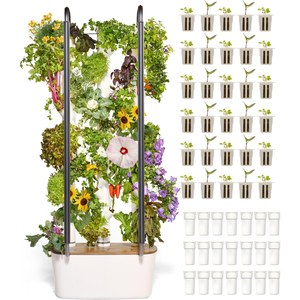
- Plant sites: 30 yPods / yCubes
- Size: 24″ W × 12″ D × 64″ H, 2 sq. ft.
- Lights: Two 40W full-spectrum LED bars
- Energy estimate: 47 kWh/month, per Gardyn
- Tank: 5 gallons; product page says refill the 4+ gallon tank every 1–2 weeks
- Warranty: 3-year warranty on the official product page
A 30-plant starter set is included, with curated mixes or a build-your-own option, and Gardyn includes plant food to get started. The company offers a 100% sprout guarantee: if a yCube does not sprout after 28 days, it will send a replacement. You do not have to fill all 30 sites at once; unused openings should be capped so light and debris stay out of the columns.
This is an indoor appliance. There is no water-line hookup and no requirement for a sunny window, but it is not a patio garden. If you want a tower that can live outside in season, look at Lettuce Grow instead.
Pros
- High plant count in a two-square-foot footprint
- Automated lights and watering, with optional AI coaching
- Sprout replacements and a 3-year official warranty
Cons
- Tall, needs wall straps and 2.4 GHz Wi-Fi
- Membership is the path to the full app experience and cheaper plants
- Purchase price is in a different league from a six-pod countertop garden
Membership, Kelby, and What Works Without It
Gardyn is clear on a point that reviews sometimes blur: you do not need a membership to grow. Standard features with the hardware include app control of the device, water-level monitoring, a manual light and water schedule, and free replacements for unsprouted plants.
Membership adds the pieces Gardyn markets most heavily. The Home plan includes 10 yCube credits a month with free shipping, 60% off additional plants, access to some member-only varieties, and Kelby: camera-based monitoring, alerts, vacation mode, time-lapses, and “Ask Kelby” chat. After you set up the device, you can start a 30-day free trial in the app; it auto-renews unless you cancel.
Month-to-month Home membership is $39. Prepaid options on the Home product page are listed at $34 a month for a one-year plan and $29 a month for a two-year plan. Studio membership is $25 a month with five credits. Unused credits roll over, up to 30 for Home and 16 for Studio. Without a membership, yCubes start at $4.99 each plus $9.99 flat-rate shipping; member pricing starts at $1.99 or one credit.
Whether that fee is worth it is a budget question, which we treat separately in Is a Gardyn worth it?. From a product-review standpoint, the honest split is this: the hardware will water and light your plants without a subscription. The “it watches every plant for me” experience is a paid layer.
Setup, Care, and Cleaning
Gardyn’s first-week story is simple: assemble the unit, insert yCubes, download the app, and wait for sprouts over the next several days. You should not leave unused openings uncovered. If you start with fewer than 30 plants, cap the empty sites.
Ongoing care, per the company, is mostly topping off the tank and adding plant food when the app or your schedule says to. The product page describes a refill of the 4+ gallon tank every one to two weeks, and an in-app prompt to add about three gallons when the level is low. Vacation Mode, a membership feature, adjusts the schedule when you are away.
Cleaning is lighter than on some older vertical gardens, at least as Gardyn describes Home 4. The company says most members clean about once a year, with no full disassembly: run a citric acid solution through the system, empty and wipe the tank, and follow Kelby’s prompt. Wear gloves with citric acid and follow the product label. Between cleanings, Gardyn recommends HydroBoost, trimming roots, covering empty sites, and refreshing the tank from time to time.
What Grows Well, and What to Be Careful With
Starter sets lean on lettuces, mild greens, herbs, and a few flowers or specialties such as kohlrabi, bunching onions, and sunflower. Official FAQ language says you can also grow larger greens, vegetables, fruits, and flowers, and the Amazon listing mentions crops such as strawberries, tomatoes, and peppers among the 100-plus varieties in the catalog. That catalog is still a catalog: a 64-inch tower can support compact fruiting plants better than a 12-inch countertop hood, but a full-size garden tomato is not the point of this machine.
The University of Minnesota Extension’s general advice still applies. Herbs and leafy greens are the most reliable indoor crops. Fruiting plants need more light and more time. If you are new to indoor growing, fill the columns with lettuces and herbs first, harvest often, and add a compact tomato or pepper only after you are comfortable keeping the tank filled and the columns clean.
You can use your own seeds in seedless yCubes if you want to experiment. Germination then becomes your responsibility, except that Gardyn’s sprout guarantee is written around its own yCubes that fail to sprout after 28 days.
Pros, Cons, and Who Should Buy It
The Home 4’s strength is density. Thirty plants in two square feet is a different proposition from a six-pod appliance, and the published 47 kilowatt-hour figure makes the power bill easy to estimate (about $8.55 a month at the EIA’s 18.19 cents-per-kWh average for 2026 through August). The cameras and sensors are genuinely useful if you like the idea of an app telling you when something is off, and they are optional if you do not.
The drawbacks are equally specific. It is tall. It wants a 2.4 GHz network. The good price on plants is tied to a membership. And $899 is a lot to spend to discover you only wanted basil. If that describes you, buy a compact countertop garden first, then come back to a tower if you are harvesting everything you grow.
Buy the Home 4 if you have the height, you want an indoor-only system, and a family-scale greens harvest is the goal. Look at the Studio if 16 plants and a 54-inch cabinet-friendlier height are enough. Look at Lettuce Grow if a patio and live seedlings matter more than cameras and a tight indoor footprint.
Frequently Asked Questions
Do I need a Gardyn membership to use the garden?
No. Gardyn says membership is not required. Without it you still get app control, water-level monitoring, a light and water schedule, and free replacements for unsprouted yCubes. Membership adds plant credits, discounts, and Kelby’s camera-based coaching, vacation mode, and chat.
How much electricity does a Gardyn Home 4 use?
Gardyn estimates 47 kilowatt-hours a month. At the U.S. average residential rate of 18.19 cents per kWh (EIA, 2026 year-to-date through August), that is about $8.55 a month. The Studio is listed at 26 kWh, or about $4.73.
How tall is the Gardyn, and where should I put it?
The Home 4 is 24 inches wide, 12 inches deep, and 64 inches tall, with a two-square-foot footprint. It needs an outlet and 2.4 GHz Wi-Fi, not a sunny window. Gardyn includes wall straps and recommends anchoring the unit to a stud.
Can I turn the cameras off?
Yes. In the Gardyn app, go to Settings, then Gardyn Cameras. The company says the cameras point at the plants, not the room, and do not record audio. Turning them off means Kelby cannot monitor the garden.
What is the difference between Home and Studio?
Home: 30 plants, 64 inches tall, two light bars, two cameras, 47 kWh/month, $899, 10 membership credits. Studio: 16 plants, 54 inches tall, one light bar, one camera, 26 kWh/month, $549, five credits. Both are indoor-only.
Related Guides
- Is a Gardyn Worth It?
- Gardyn vs. Lettuce Grow
- Best Hydroponic Indoor Gardens Compared
- Indoor Hydroponic Gardens Guide
- AeroGarden vs. Click & Grow

The Gardener’s Voice Team publishes practical gardening guides and product comparisons for home gardeners. We explain how tools, soil, watering systems, and lawn equipment work, and we show our sources when we cite a figure or a recommendation.